MS SQL on macOS: Use Oracle SQL Manager to Access Your Database
How I connect to an Azure SQL or MS SQL Server database from macOS for free, using Oracle SQL Developer and the jTDS JDBC driver.

On this page
Update, September 2026: I wrote this in 2016. The jTDS driver hasn’t been updated in years, and I no longer use this setup. Today the easiest free option on macOS is Visual Studio Code with Microsoft’s SQL Server (mssql) extension. For scripts, see the Python post in this series.
In this article series, I’ll review the tools and options to connect to an MS SQL server on macOS.
Table of contents:
Prerequisites
In order to connect to Azure SQL Database from MacOS (OS X) for free, you need two things:
Download these files and install Oracle SQL Developer. Then extract the JTDS driver zip file in a desired location (e.g., \Users\"Your User Name"\JTDS\).
Configuring the JDBC Driver
Now open your Oracle SQL Developer and from the menu open preference as following figure shows:
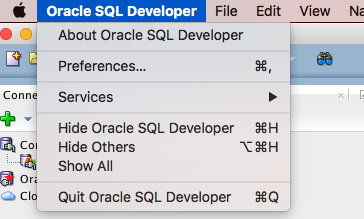
From the Preference window, open Database > Third Party JDBC Drivers:
Click on the photo to open the full size image!
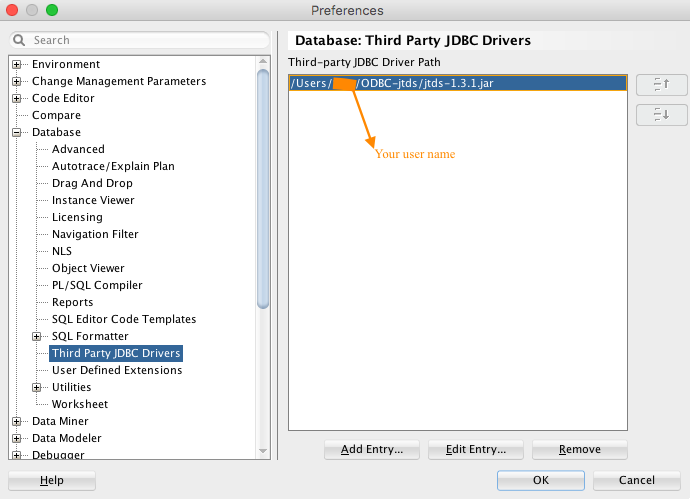
Here click on Add Entry and find your JTDS folder and choose jtds-1.3.1.jar as the driver path and click on Select and then OK.
Note: Before moving on from this part, make sure you have added your IP address in the firewall setting of your Azure Portal’s desired database.
Adding Your Database
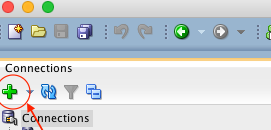
Now you are ready to add your database to the program. From the connection pane on the left, click on the “+” button.
Now click on “SQLServer” tab and add your database connection information:
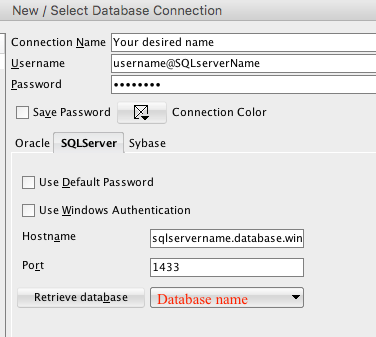
Click on connect. Don’t forget to retrieve your database here. Now save this profile. Now your database is ready to be inquired by transact SQL.
Next article: MS SQL on macOS: Connect to your database using Python
Lead AI Engineer. I write about reinforcement learning, transformers, multi-agent systems, and the tools I build along the way.