Inkling 2 Mini on a 12 GB GPU: Zero-Shot CIFAR-10, Loop Depth and Expert Routing
Inkling 2 Mini gets 96.2% on CIFAR-10 with no training, on one 12 GB GPU. Its third loop pass rewrites the state, and image tokens get their own experts.

On this page
Thinking Machines released Inkling 2 Mini on November 20. It’s a 26B mixture-of-experts model that reads images and text, and it has an odd trick: half of its layers run three times. I wanted to see what that looks like from the inside, on the same RTX 3080 Ti (12 GB) that trained every model in the Small Vision Transformers posts.
So I ran five small experiments in two days:
- Zero-shot CIFAR-10: how well does it name the class of each test image with no CIFAR-10 training, next to the models I trained in the earlier posts?
- Loop depth: a research checkpoint can run its loop 1, 2 or 3 times. What does each pass buy?
- Loop gates: how much does each pass take from the pass before it?
- Expert routing: do image tokens use different experts than text?
- Speed and reasoning effort: how fast is it on 12 GB, and what does more thinking buy on grade-school math?
How the model works
Inkling 2 Mini has 24 decoder layers of weights, but each token goes through 48 layer visits. Layers 0-5 (the prelude) run once, layers 6-17 (the core) run three times with the same weights, and layers 18-23 (the coda) run once.
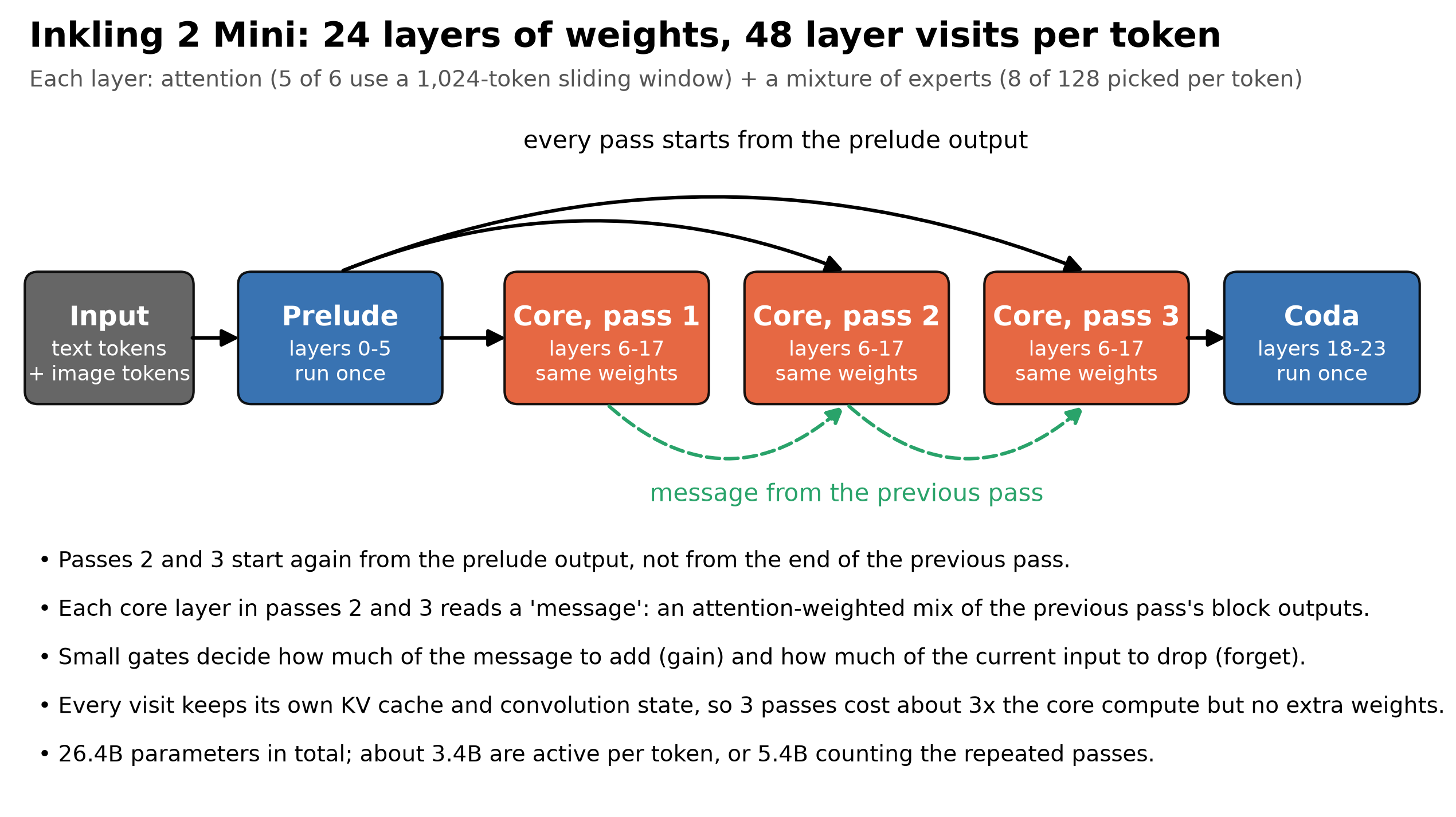
The part that surprised me when I read the llama.cpp code: pass 2 does not continue from the end of pass 1. Every pass starts again from the prelude output. What carries over is a “message”. Each core layer in pass 2 or 3 looks back at the block outputs of the previous pass, mixes them with a small learned attention, and feeds the mix in through two gates:
- A gain gate decides how much of the message to add.
- A forget gate decides how much of the layer’s own input to drop.
Both gates are a tanh of a small projection (rank 64) of the current input and the message, so each one is a number between -1 and 1 for every channel of every token.
The rest of each layer is a modern decoder layer. Five of every six layers use attention over a sliding window of 1,024 tokens, and one uses full attention, which is how the model reaches a 1M-token context. The feed-forward part is a mixture of experts: a router picks 8 of 128 small experts for each token in each layer visit. That’s why the model has 26.4B parameters but only about 3.4B are active per token (5.4B if I count the repeated passes).
Images go through a separate vision encoder that cuts the image into 20 × 20 pixel patches and merges each 2 × 2 group into one token. So a 240 × 240 image becomes 36 image tokens.
Running it on 12 GB
The 4-bit GGUF file (IQ4_NL) is 17.6 GB, so it does not fit in 12 GB of GPU memory. llama.cpp can keep the expert weights of some layers in CPU RAM and the rest on the GPU. Only 8 of 128 experts run per token, so the CPU part stays cheap.
- Download llama.cpp build b12600 or later. Build b12599 does not know the
inkling2_looparchitecture. - Download
Inkling-2-Mini-IQ4_NL.ggufandmmproj-Inkling-2-Mini-BF16.gguffromggml-org/Inkling-2-Mini-GGUF. - Start the server with the experts of 12 layers in CPU RAM:
$ llama-server -m Inkling-2-Mini-IQ4_NL.gguf --mmproj mmproj-Inkling-2-Mini-BF16.gguf -ngl 99 --n-cpu-moe 12 -ub 16 -c 16384 -np 4
WARNING: Do not remove -ub 16. Without it, the CUDA build of b12600 returns garbage for this model.
The first answers were all question marks
My first image request came back as ????????????????. So did every image after it, at every size, and then plain text did too. I spent a while on the wrong idea (the image size, then the vision encoder) before the pattern came out:
- Short text prompts worked. A 51-token text prompt failed. So it was not about images at all.
- The vision encoder output was fine, with no NaN values.
- With the variable-loop checkpoint set to 1 pass, images worked. With 2 or 3 passes, they failed.
- A CPU-only build that I compiled from the same commit gave correct answers for everything.
- The prebuilt CUDA build worked when each micro-batch (the chunk of prompt tokens the GPU processes at once) held 16 tokens, and failed at 32 or more.
So the bug is in the CUDA path of b12600 for the looped layers, and it only shows up once a prompt is longer than a few dozen tokens. A small micro-batch avoids it. Every result in this post uses -ub 16.
Zero-shot CIFAR-10
I gave the model each test image, upscaled to 240 × 240, with this question: “Which one of these classes does it show: airplane, automobile, …, truck? Answer with the class name only.” Reasoning effort was none, which still lets the model think for about 80 tokens before it answers. I read the first class name in the answer. I ran all 10,000 test images, and only 5 answers named no class.
| Model (CIFAR-10 test set) | Trained on CIFAR-10? | Accuracy |
|---|---|---|
| Inkling 2 Mini, 240 px (all 10,000 images) | No | 96.2% (± 0.2) |
| ResNet-18 from the ViT post | Yes | 94.9% |
| Small ViT from the ViT post | Yes | 92.9% |
| Joint diffusion model from the last post | Yes | 87.2% |
| Diffusion classifier from the last post | Yes | 86.7% |
| Inkling 2 Mini, native 32 px (500 images) | No | 59.2% (± 2.2) |
A model that never saw my training set beats the best model I trained on it, by 1.3 points. I can’t say it never saw CIFAR-10 at all, though. The images have been on the internet since 2009, so some of them are probably in its training data. Read “zero-shot” here as “no CIFAR-10 training by me”.
The 32 px row is the surprise. Same images, same prompt, and accuracy drops from 94.6% to 59.2% on the same 500 images. The vision encoder makes one token per 40 × 40 pixel tile, so a 32 × 32 image becomes a single image token: the whole picture squeezed into one vector. Upscaling to 240 px makes no new detail, but it gives the model 36 tokens to look at. It also thinks less when it can see: 80 reasoning tokens at 240 px against 125 at 32 px.
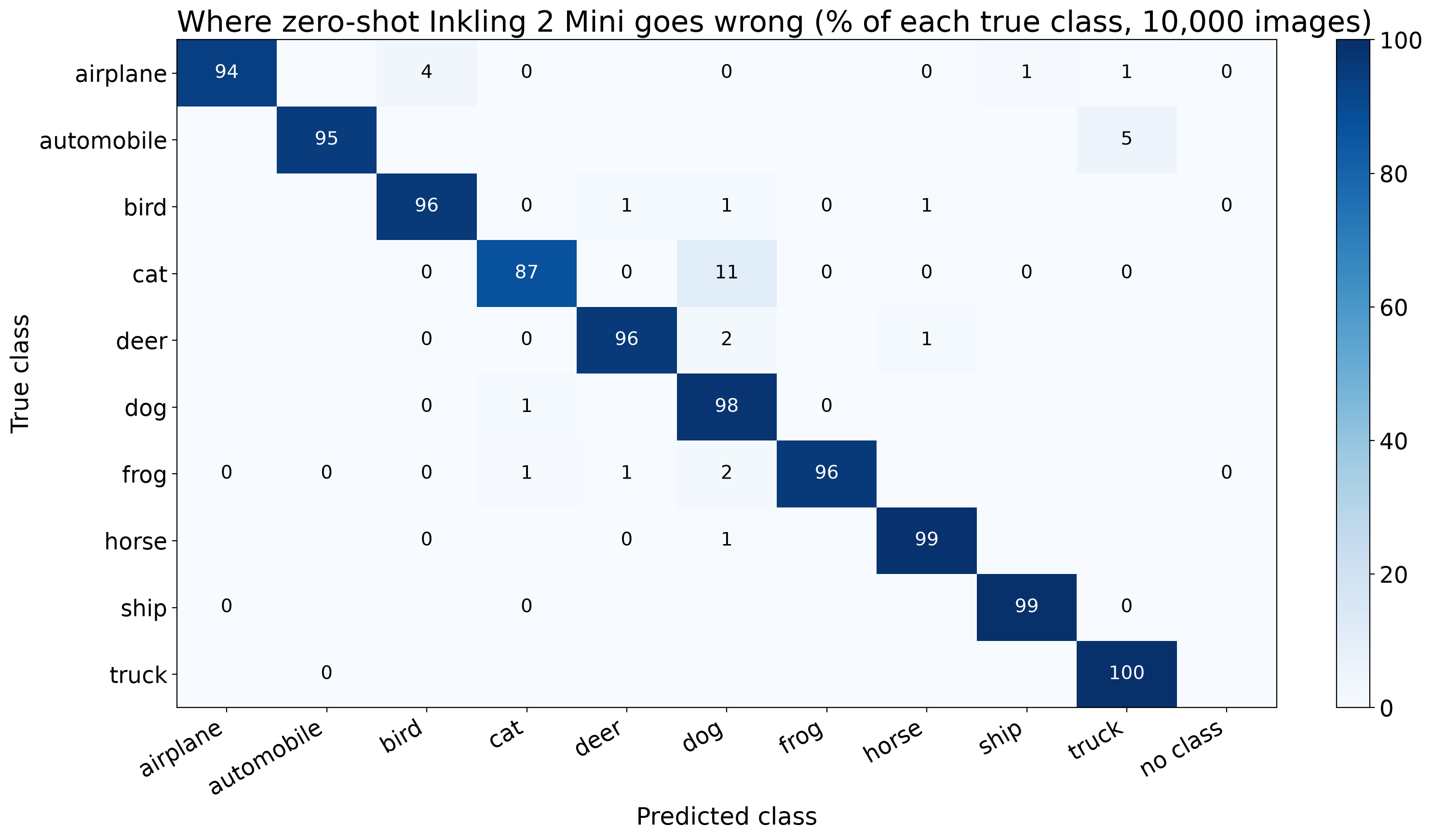
Cat is the weak class, as it was for the diffusion classifiers in the last post. 109 of its 126 errors are “dog”. The next biggest mix-ups are automobile called truck (48 times) and airplane called bird (35). Truck was wrong only once in 1,000.
How many passes does it need?
The second checkpoint, TML-d24-varloop-research, has the same architecture but was trained to work with 1, 2 or 3 passes. llama.cpp reads the pass count from the file, so one flag changes it:
$ llama-server -m TML-d24-varloop-research-IQ4_NL.gguf --override-kv inkling2_loop.loop.count=int:1 ...
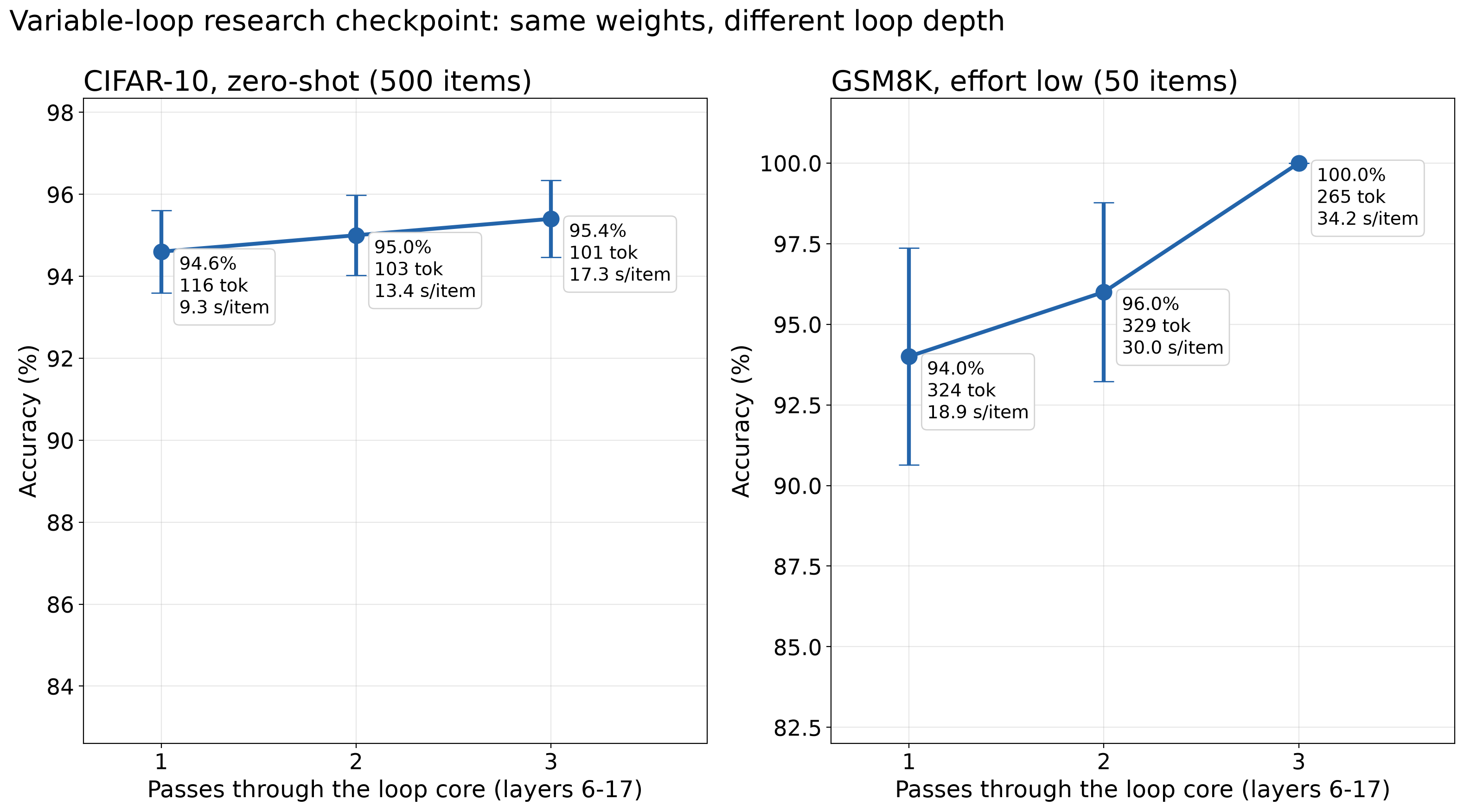
I ran 500 CIFAR images and the first 50 GSM8K grade-school math questions at each depth.
| Passes | CIFAR-10 (500) | s per image | GSM8K (50) | s per question | Generation, tokens/s per request |
|---|---|---|---|---|---|
| 1 | 94.6% | 9.3 | 94% | 18.9 | 17.1 |
| 2 | 95.0% | 13.4 | 96% | 30.0 | 10.9 |
| 3 | 95.4% | 17.3 | 100% | 34.2 | 7.8 |
Both tasks get a little better with each pass, and both point the same way. But the CIFAR differences are inside one standard error (about 1 point), and 50 math questions can’t separate 96% from 100% with any confidence. I ran each setting once, so I can’t say how much of this is noise from the sampling order of four parallel requests.
The cost is clear, though. Each pass adds 12 layer visits per token, and generation drops from 17 to 8 tokens per second per request. For naming the class of an image, 1 pass gets 99% of the accuracy in half the time. For math, I’d keep all 3.
What the extra passes do
To see inside the loop, I wrote a small probe on top of llama.cpp. It runs a prompt once and saves, for every token and every one of the 48 layer visits, the 8 experts the router picked, the layer output, and the two gates. I ran it on 52 prompts: 20 CIFAR images (36 image tokens each) and 8 short prompts each of English, code, math and other languages (German, Spanish, French, Chinese, Persian, Italian, Japanese, Russian). I only count the image tokens of image prompts and the user’s own text tokens of text prompts, not the chat template around them.
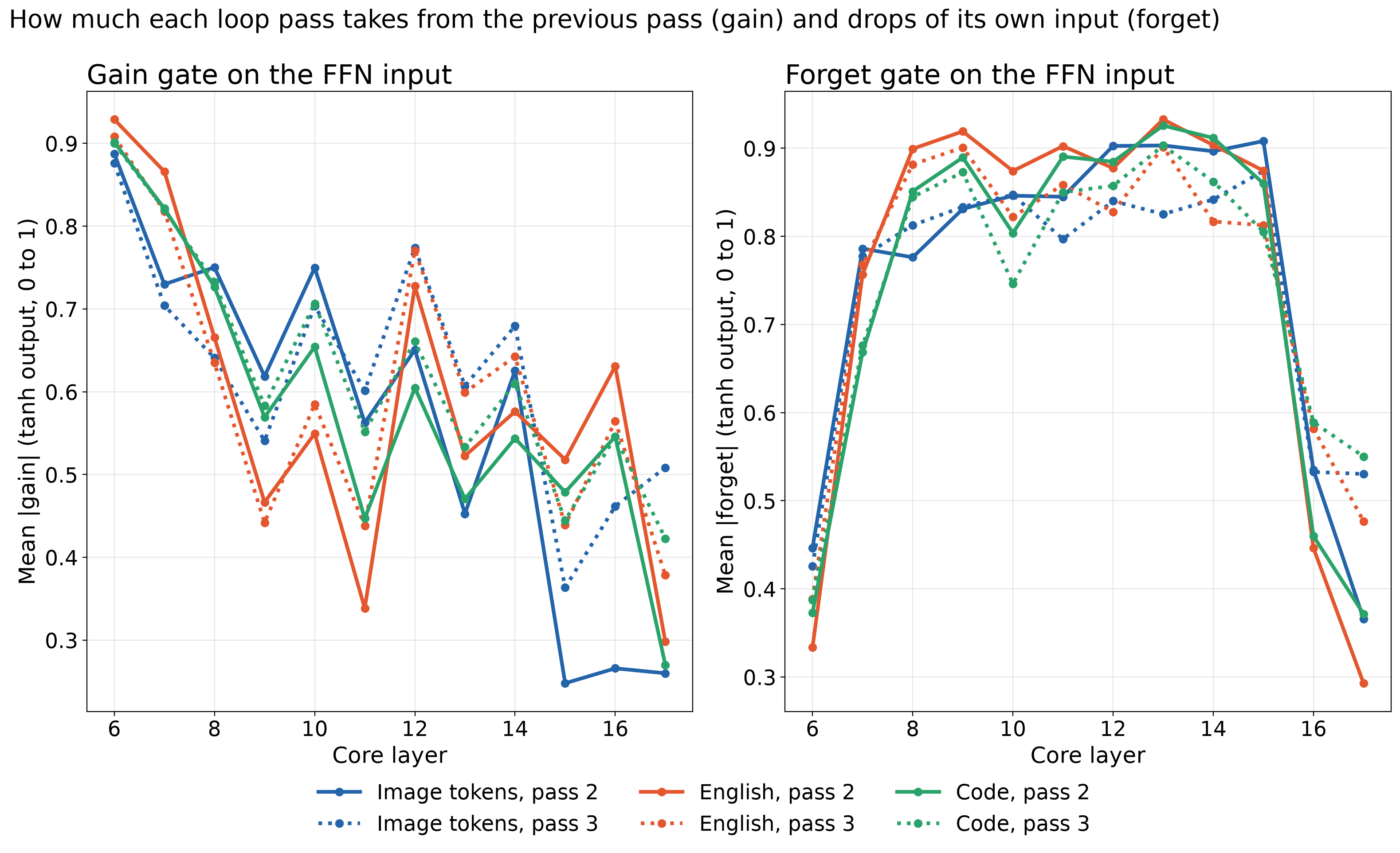
The gates are not shy. In the middle of the core, the forget gate averages 0.8 to 0.9, so each layer in passes 2 and 3 throws away most of its own input and leans on the message from the previous pass instead. The gain gate is strongest at the first core layer and gets weaker with depth. Images and text use the gates in almost the same way.
Then I compared the output of the core (layer 17) between passes:
| Core output, layer 17 | Pass 1 → 2 | Pass 2 → 3 |
|---|---|---|
| Cosine similarity, median over tokens | 0.94 to 0.95 | 0.21 to 0.33 |
| Relative change, median | 0.33 to 0.38 | 1.11 to 1.24 |
The range covers the five kinds of input; they all agree. Pass 2 is a small polish on pass 1. Pass 3 is something else: its output points in a very different direction from pass 2’s. Only pass 3 goes on to the coda, so my reading is that the last pass turns the state into what the last six layers expect, and the first two passes build it. The gates hint at the same thing: the last two core layers (16 and 17) forget much less than the middle ones.
The router agrees with that, partly. For the same token in the same layer, 62% to 72% of its 8 experts stay the same from one pass to the next. Random picks would share 6% (8 of 128). So the passes mostly reuse the same experts, even when their outputs end up far apart.
Which experts look at images?
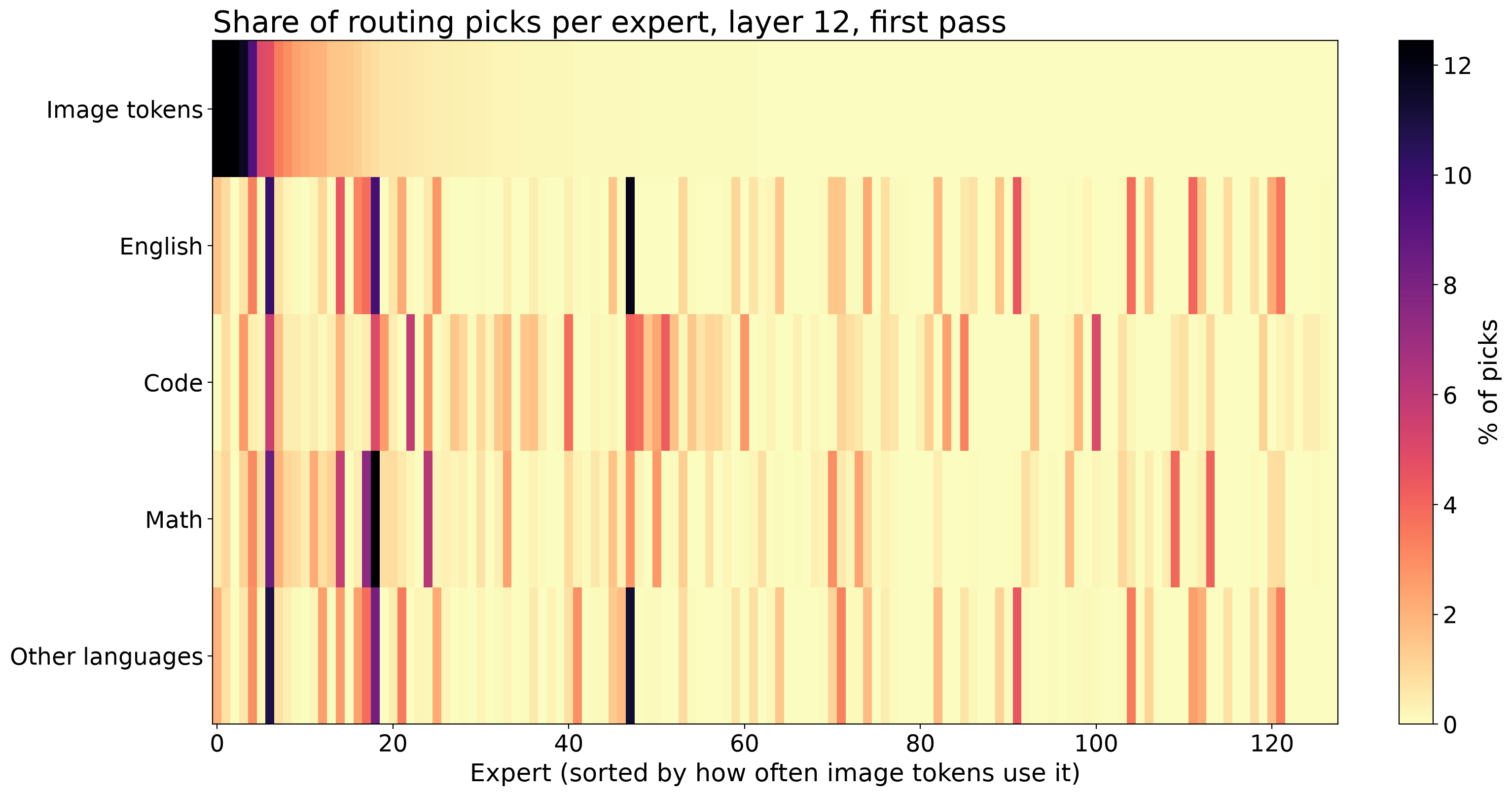
At layer 12, the 8 experts that image tokens use most take 71% of all image-token picks. The same 8 experts take only 11% to 18% of text picks. So image tokens do have their own small set of experts, at least in this layer.
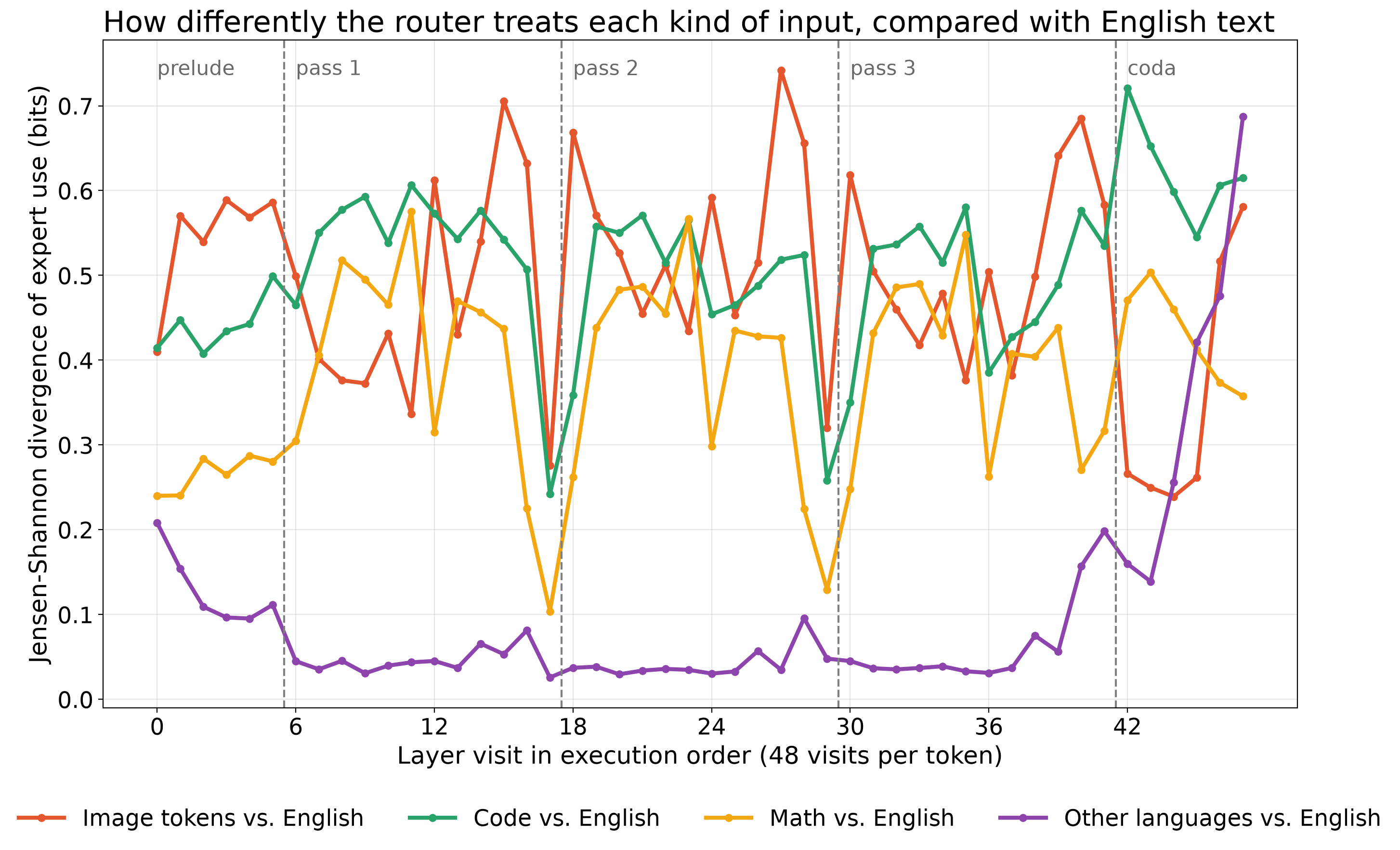
The Jensen-Shannon divergence (how different two distributions are, from 0 to 1 bit) shows the same thing in every layer visit. Image tokens and code route very differently from English. Math is in between. Other languages route almost exactly like English (about 0.03 to 0.1 bits) from the third layer through all three core passes, and only split off in the last coda layers, close to where the model picks the output words. I wrote the other-language prompts as translations of the English ones, which helps this comparison but probably also pushes the two closer together.
A few things I can’t conclude from this probe. It ran on 1,600 tokens from 52 prompts, so a single prompt can move an expert’s share. It ran on the 4-bit quantized model in a CPU build, and quantization can flip near ties in the router. And picking an expert is not the same as needing it: I didn’t switch experts off to see what breaks.
Speed and reasoning effort
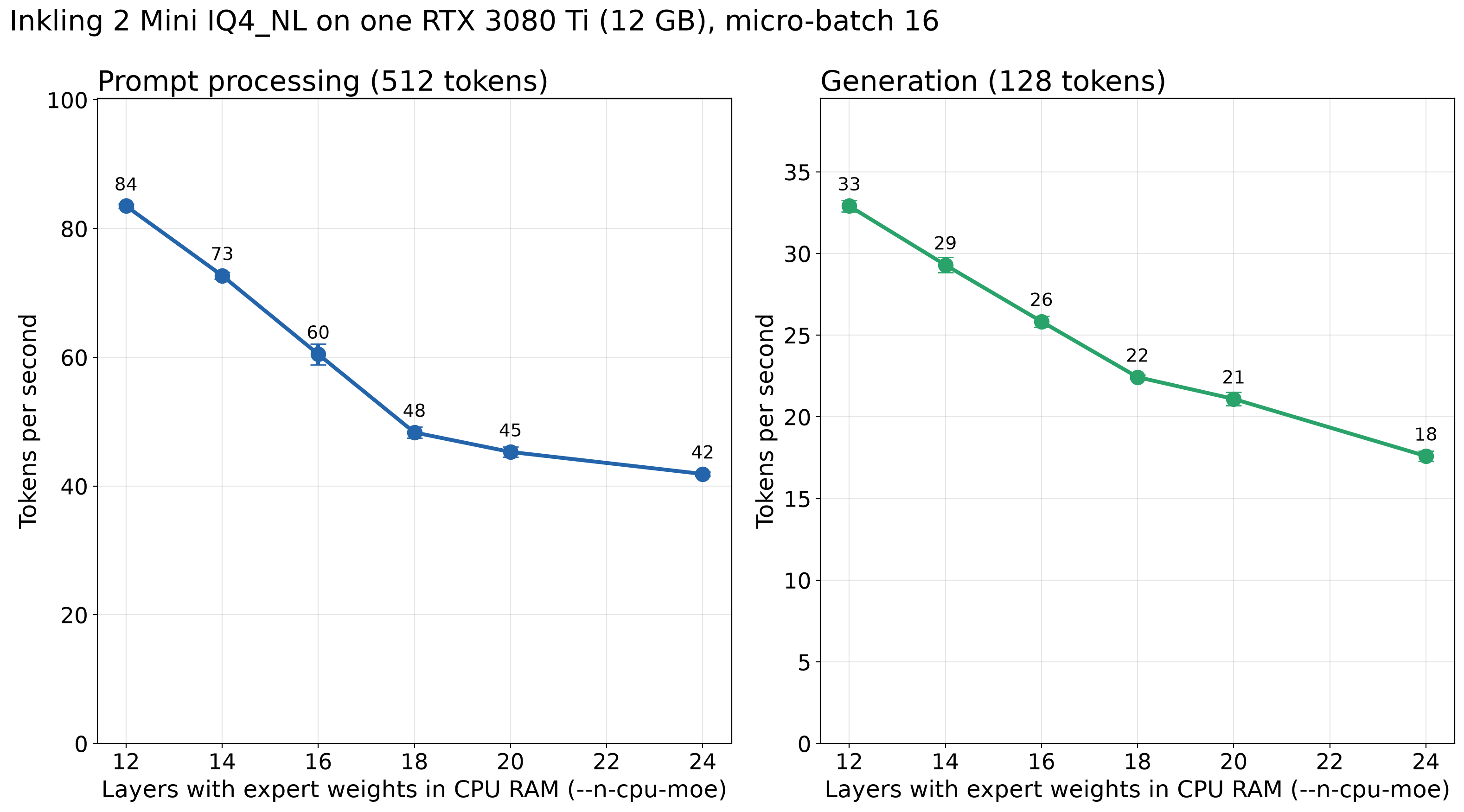
Each layer whose experts move to CPU RAM costs speed. With 12 layers on the CPU, generation runs at 33 tokens per second with one request, which is fine for chat. Prompt processing is slow, at 84 tokens per second, because the bug workaround limits the GPU to 16 tokens at a time. With the default micro-batch it measured about 3 times faster, but those answers were garbage.
I also ran out of GPU memory once at 12 layers. The 3080 Ti also drives my monitors, so Chrome and VS Code hold part of its memory. I used 14 layers for the rest of the runs.
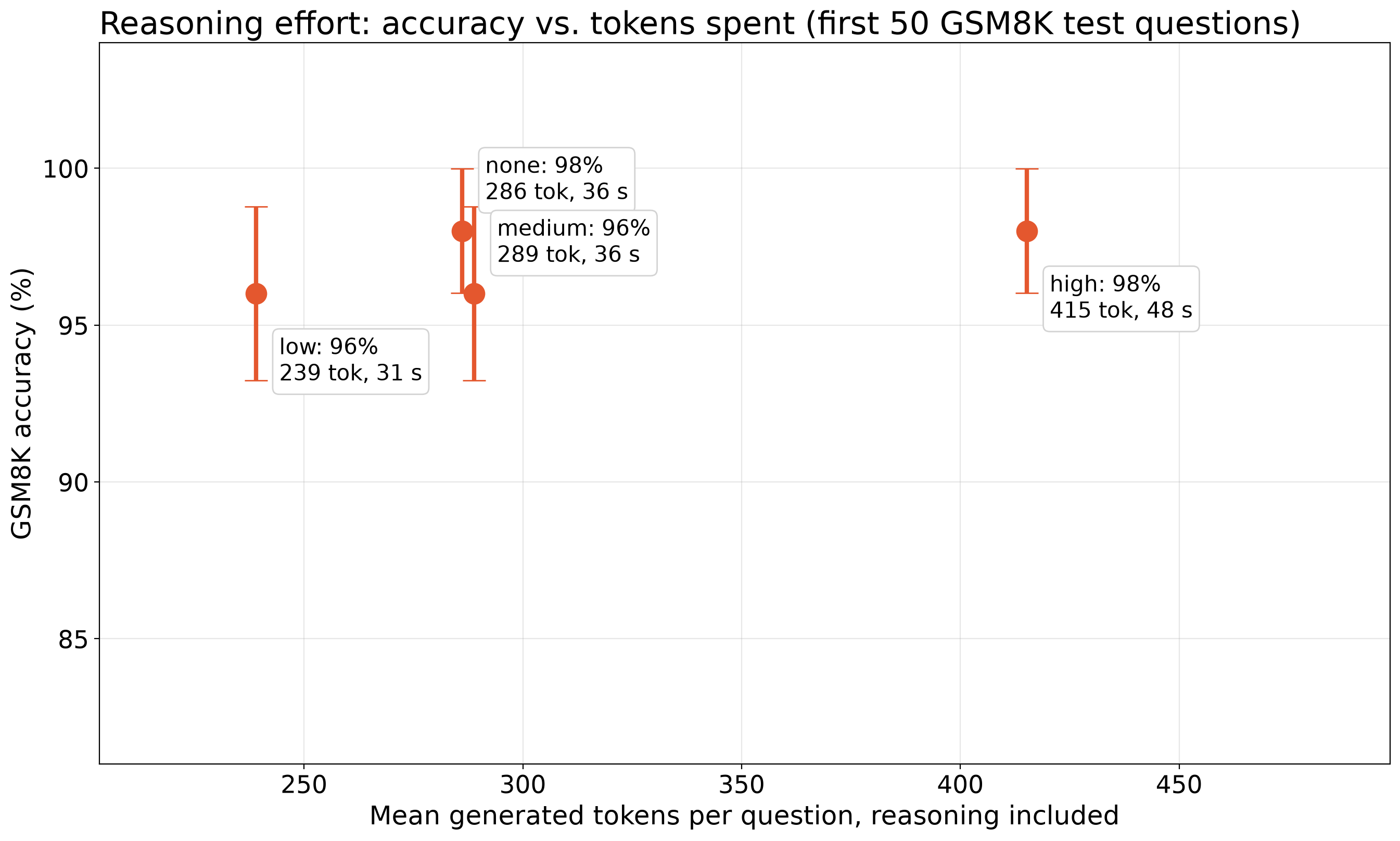
The reasoning-effort test didn’t work out the way I hoped. All four levels got 48 or 49 of the first 50 GSM8K questions right, so this test is too easy to show what more thinking buys. What I can say: high used 45% more tokens than none and took 33% longer, and none still writes about 290 tokens of working before the answer. To see a real difference, I’d need harder problems.
Reproduce it
The code is in the repo. It needs Windows, an NVIDIA GPU with 12 GB, 32 GB of RAM, and llama.cpp b12600 or later.
- Install the Python packages with
uv sync. - Download the llama.cpp CUDA build into
bin/, and the two GGUF models intomodels/. - Put CIFAR-10 in
../data/cifar-10-batches-py/. - Run all GPU experiments in order. Each step continues from its result file if it stops:
$ bash scripts/queue_gpu.sh
- Build the probe from
probe/against llama.cpp commit29b52d398, then run it and make the charts:
$ uv run python scripts/run_probes.py
$ uv run python scripts/make_figures.py
What I take from this
- A 26B mixture-of-experts model runs well on a 12 GB GPU if most expert weights stay in CPU RAM. Generation at 30 tokens per second is fine; prompt processing is the slow part.
- With no CIFAR-10 training, it beats the best classifier I trained in this series (96.2% against 94.9%), at about 15 seconds per image (four at a time) instead of a fraction of a millisecond.
- Upscale small images before you send them. At 32 px the model sees one token and drops to 59%.
- The loop passes are not three copies of the same step. Pass 2 polishes pass 1, and pass 3 rewrites the state for the last layers. On classification, 1 pass is nearly as good as 3 at half the time.
- Image tokens get their own small group of experts. Other languages share the English experts until the last few layers.
- New model support is fragile on release day. llama.cpp’s CUDA build gave garbage for any prompt over about 30 tokens, and a short “hello” test would never show it.
I write about reinforcement learning, transformers, multi-agent systems, and the tools I build along the way.